7/17/2026
Case Studies
Client Onboarding for Mortgage Brokers: Collect Loan Docs Faster
How mortgage brokers can onboard borrowers and collect income, asset, and identity documents in one place without the endless email back-and-forth.

Whether you're onboarding new clients, collecting documents, or building intake forms, we'll help you get organized.
OnboardMap replaces email chaos with one link. Clients complete every step. You see progress instantly.

No social posts defined in this article's frontmatter yet.
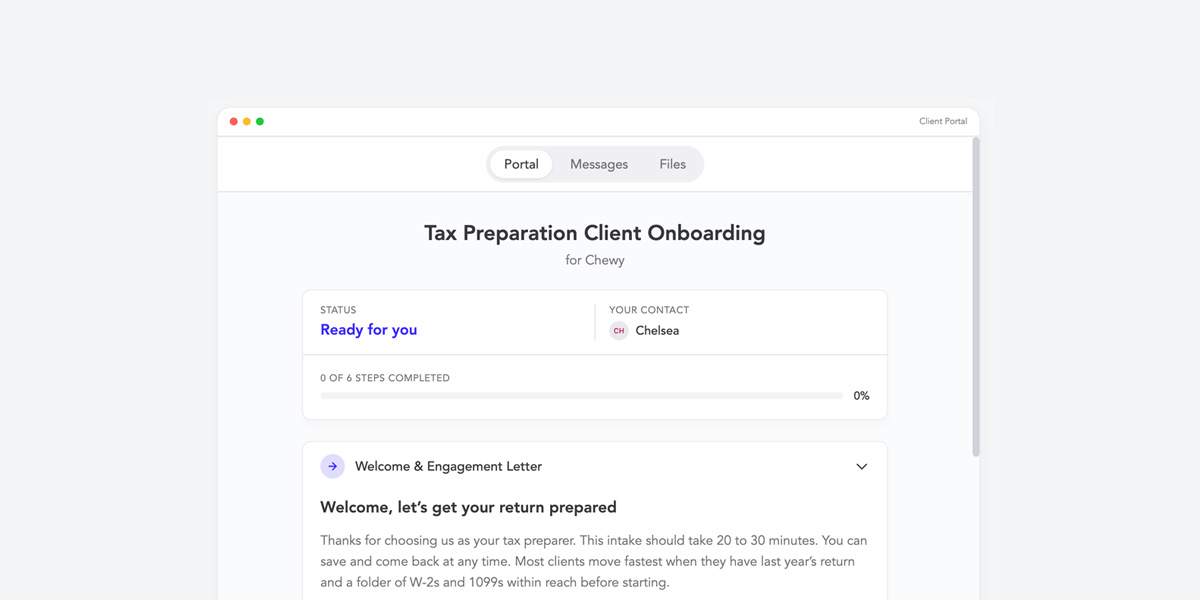
TLDR: Most bookkeepers send a welcome email with a doc list buried in a PDF, then chase clients for two weeks. This article shows you the alternative, live in the page below: a single branded portal where your client sees a clear checklist, current step, and progress bar. Click any task to expand. Tap the checkboxes to mark steps done. The progress bar updates as you go. Then read the breakdown of the 5 items every great tax-season intake includes, why each one matters, and how to clone this exact template into your own firm in 10 minutes. No signup to view the demo.
A welcome email. A 12-line PDF labeled “Documents Needed” attached. A vague closing line: “Send these over when you have a chance!”
Then nothing. Then a follow-up. Then another follow-up. Then your client sends three of the eight items, attached as photos to a reply on an unrelated email thread, with a bank statement that’s missing two months and a W-9 from 2019.
This isn’t your client being difficult. It’s the medium. Email is a terrible interface for collecting structured information. Your client doesn’t know what’s been received, what’s still outstanding, or what to do next, because email doesn’t tell them. So they do nothing. And you write follow-ups.
There is a better version. It looks like this.
Below is exactly what your client would see when you send them a single OnboardMap link. Click any task to expand it. Tap the checkboxes inside the open tasks to mark items complete. The progress bar updates as you go. The header is decorative for the demo (we don’t want you wandering off to “Messages”), but everything in the body is interactive, just like the real product.
That’s the whole client experience. No login, no password, no app to install. Your client opens the link from their email, sees a checklist tailored to your firm, and works through it at their own pace. You watch progress in real time on your dashboard. Reminders go out automatically when they stall.
Now let’s break down what’s actually in the checklist, because the experience is only as good as the items you put in it.
Most bookkeeping intake lists are too long, too vague, or too generic. The version in the demo above is built for a real first-time tax-season client. Five items, in the order to ask:
This belongs first. Not third, not “we’ll get to that,” not “I’ll send it once we kick off.” First. The engagement letter defines the scope of work, the fee, the timeline, and what happens when something is out of scope. Without it signed before any other work begins, you will end up doing month two of bookkeeping for free because the client “thought that was included.”
In the demo, this item is marked Done because it’s the first thing you should collect. The portal supports e-sign tasks, so the client can review, sign, and return without ever opening DocuSign separately.
The prior-year return tells you almost everything you need to know about the client’s structure: entity type, fiscal year, depreciation schedules carried forward, NOLs, prior-year elections, and which forms they filed. It’s the single highest-information document a new client can give you, and it takes them 30 seconds to upload if they have it.
If they don’t have it, that’s also useful information. It means their previous accountant didn’t give them a copy, which means you need to budget for a 4506-T request from the IRS.
Three months minimum, current year operating account. This is the Current step in the demo because it’s typically where new clients stall. They don’t know which account you mean (“operating, savings, both?”), they don’t know whether to send PDFs or CSVs, and their bank’s website logs them out before they finish exporting.
The portal solves all of that with a single instruction line (“Upload one PDF per month for your operating account”) and three clearly labeled upload slots. No ambiguity, no follow-up email about “did you mean this account or the other one?”
Add Sarah as Accountant User in QBO. Two steps, both inside the client’s own QBO settings. The demo expands this task with the exact click path because new clients have never invited an accountant before and Googling “how to add an accountant to QuickBooks” sends them to seven different versions of the answer for desktop, online, and self-employed.
If you’re on Xero, FreshBooks, Wave, or anything else, the same task structure works. The point is the client gets a 2-step instruction list, not “let me know when you’ve added me.”
Standard. Usually the easiest item on the list, which is why it’s last. By the time the client gets here, they’ve already done four harder things and they have momentum. Asking for the W-9 first (because it’s the easiest) is a common mistake; it makes the rest of the list feel like a longer climb. Save the easy item for the end and the client closes the loop on a small win.
Three design decisions in the portal do most of the work:
1. No login. The client opens the link from their email. They don’t make an account. They don’t get locked out. They don’t have to remember a password during the most stressful month of their financial year. Removing the login removes the largest single source of intake friction in every other tool on the market.
2. Ordered, not alphabetical. The tasks are sequenced from most-important to easiest, with the current step visually highlighted. Your client always knows the next thing to do. They never have to make a decision about what to work on first, which means they never get stuck.
3. Status-tracked. Done, current, todo. Three states, color-coded, visible at a glance. Your client sees their own progress and feels the momentum. You see the same dashboard view from your side and know exactly where every onboarding stands without opening a single client file.
The result, across the bookkeeping firms running this format: onboarding time drops from a typical 14 days to 3 to 5. The same checklist that used to take 10 follow-up emails to complete now closes itself.
The portal in the demo is a real OnboardMap template. You can clone it into your own firm and have a working version, branded with your logo and ready to send to a real client, in about 10 minutes.
If you’d rather have the OnboardMap team build it for you, we offer a free white-glove setup for SE bookkeeping firms: you send us your existing intake docs, we build the template, brand it with your logo, and walk your team through the result. Email austin@onboardmap.com with the subject line “free setup” and we’ll get you a portal in 3 business days.
Either way, the era of writing “just following up” emails about bank statements is over. Your clients are ready for a better experience. Show them one.
Send one link. Clients upload docs, fill intake forms, and complete every step — automatically tracked. No account required for your clients.
Austin Spaeth is the founder of OnboardMap, a client onboarding portal for service businesses. After years of watching agencies and consultancies lose time to scattered onboarding processes, he built OnboardMap to give every client a single link with everything they need to get started.
Onboard clients in one sentence. Describe what you need and OnboardMap builds the whole onboarding, checklist, forms, and document requests, then sends one link and tracks every step for you.
Start For Free